Storing Vectors in S3
Using S3 Vector Buckets to store and query semantic vectors
Chunk and Embed Text
Chunking is a process that breaks up large volumes of text into smaller elements for processing. Some of the benefits of chunking are:
- Keeps documents within model token limits
- Allows large files to be processed piece by piece
- Improves retrieval accuracy by focusing on smaller, coherent chunks
- Produces better semantic matches in vector search
- Provides more relevant context for RAG workflows
- Enhances LLM responses and reduces hallucinations
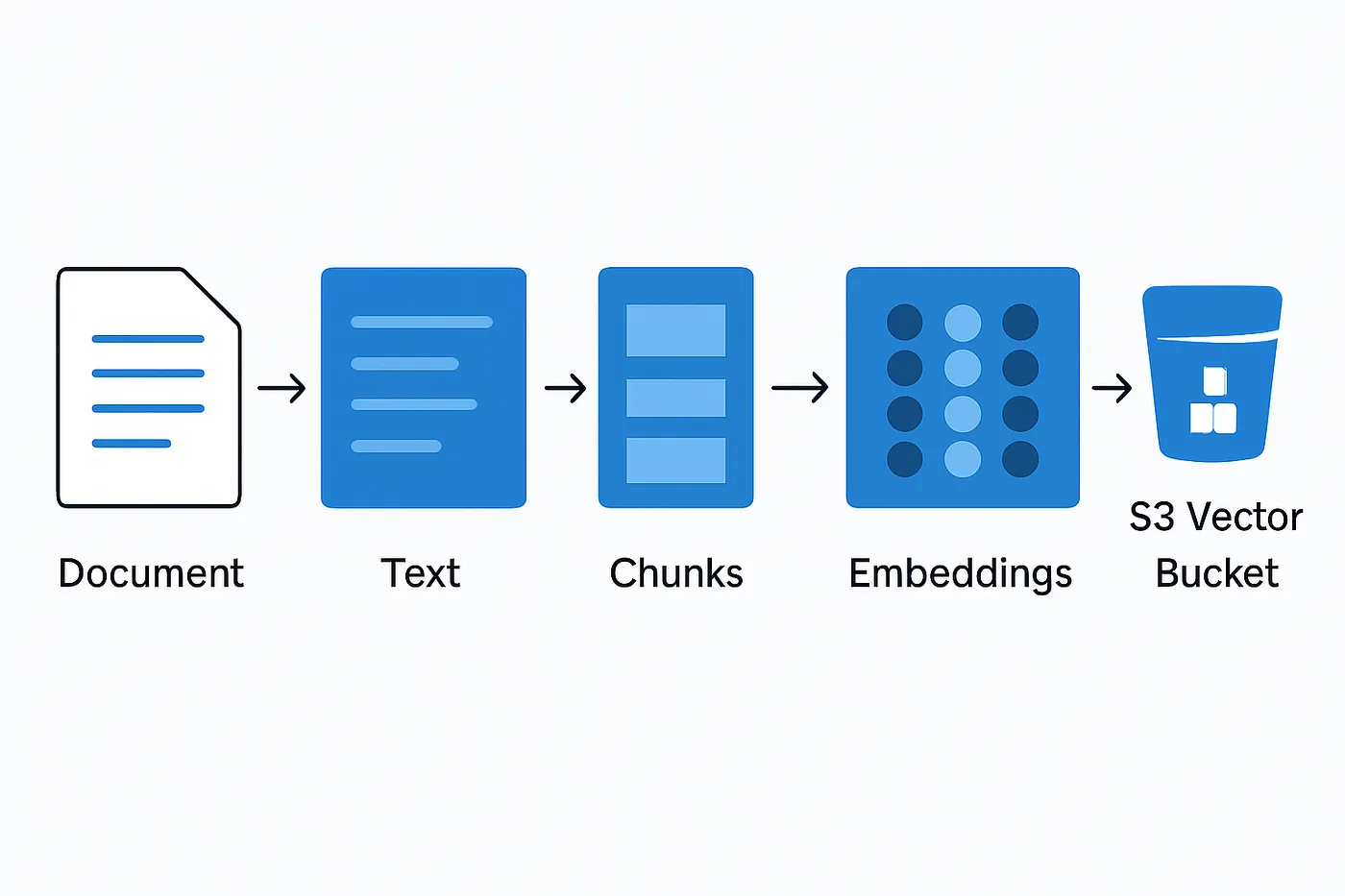
Chunking is performed by partitioning the input words into arrays of length upto maxSize.
const chunkText = (
  words: string[],
  maxSize: number,
  overlapWords: number
): string[] => {
  if (maxSize === Infinity) {
    return [words.join(' ')]
  }

  const chunks: string[] = []

  let start = 0
  while (start < words.length) {
    const end = Math.min(start + maxSize, words.length)
    const chunk = words.slice(start, end).join(' ')
    chunks.push(chunk)
    start += maxSize - overlapWords
  }

  return chunks
}
When we embed the chunks, it important to include some context with the input. For this, we use the option chunkFormat, which allows the input to be wrapped with an arbitary string.
import { BedrockRuntimeClient, InvokeModelCommand } from '@aws-sdk/client-bedrock-runtime'

const client = new BedrockRuntimeClient({ region: 'us-east-1' })

export interface EmbeddedText {
  vector: number[]
  text: string
}

export const embedText = async (
  text: string,
  opts?: {
    chunkSize?: number,
    chunkOverlap?: number,
    chunkFormat?: (input: string) => string
  }): Promise<EmbeddedText[]> => {
  const {
    chunkSize = 300,
    chunkOverlap = 30,
    chunkFormat = (input: string) => input
  } = opts || {}

  const chunks = chunkText(text.split(' '), chunkSize, chunkOverlap)

  return await Promise.all(chunks.map(async inputText => {
    const formattedText = chunkFormat(inputText)
    console.log('chunk text', formattedText)
    const input = {
      modelId: 'amazon.titan-embed-text-v2:0',
      contentType: 'application/json',
      accept: 'application/json',
      body: JSON.stringify({
        inputText: formattedText
      }),
    }

    const command = new InvokeModelCommand(input)
    const response = await client.send(command)

    const body = JSON.parse(new TextDecoder().decode(response.body))
    console.log('embed text resp: ', body)

    const vector = body.embedding as number[]

    return { vector, text: inputText }
  }))
}
Upload Vectors
We define a key which will be the prefix for all uploaded vectors. When a vector is uploaded, we assign it a key ${prefix}-${chunkIndex}. Furthemore, its important to:
- Keep a record of the keys used when uploading vectors.
- Attach the original text and the ID of the chunked document as metadata.
Later, when we search for vectors, the document ID will be used to group vectors/chunks by their parent.
const upload = (key: string, embeddings: EmbeddedText[]): Promise<Set<string>> => {
    const keys = new Set<string>()

    const promises = embeddings.map(async (embedding, index) => {
      if (!embedding || !Array.isArray(embedding.vector) || embedding.vector.length === 0) {
        throw new Error(`invalid embedding at index ${index} for key ${key}`)
      }

      const input = {
        indexArn: process.env.VECTOR_BUCKET_INDEX_ARN,
        vectors: [
          {
            key: `${key}-${index}`,
            data: {
              float32: embedding.vector,
            },
            metadata: {
              text: embedding.text,
              serializedKey: key
            },
          },
        ],
      }

      try {
        const resp = await s3Vectors.send(new PutVectorsCommand(input))
        keys.add(`${key}-${index}`)
        console.log(`Vector uploaded successfully: ${key}-${index}`, resp)
      } catch (err) {
        console.error(`Failed uploading vector ${key}-${index}:`, err)
      }
    })

    await Promise.all(promises)

    return keys
  }
Delete Vectors
Deleting vectors is simply a case of running a DeleteVectorsCommand with the vector keys we created previously.
const delete = (vectorKeys?: Set<string>) => {
  if (!vectorKeys || vectorKeys.size === 0) {
    console.log('No vector keys provided for deletion')
    return
  }

  const resp = await s3Vectors
    .send(
      new DeleteVectorsCommand({
        indexArn: process.env.VECTOR_BUCKET_INDEX_ARN!,
        keys: Array.from(vectorKeys),
      })
    )

  return resp
}
Search Vectors
Using a query vector as our input, we search all vectors that are similar to the input. The response is upto topK similar vectors. Each vector has a distance value between 0 (identical) and 1 (different).
const query = (
  query: string,
  opts: {
    topK?: number
    distanceThreshold?: number
  } = {}) => {
  const vector = await embedText(query, { chunkSize: Infinity })

  if (vector.length === 0) {
    throw new Error('Failed to generate vector for query')
  }

  const input = {
    indexArn: process.env.VECTOR_BUCKET_INDEX_ARN!,
    queryVector: {
      float32: vector[0].vector,
    },
    topK: opts.topK || 5,
    returnMetadata: true,
    returnDistance: true,
  }

  const resp = await s3Vectors.send(new QueryVectorsCommand(input))

  if (!resp.vectors || resp.vectors.length === 0) {
    console.log('No vectors found for the query')
    return null
  }

  // Flatten and normalize hits with metadata
  const nearestVectors: SearchVectorHit[] = resp.vectors
    .map(v => {
      const metadata = v.metadata as VectorMetadata | undefined
      if (!metadata) {
        throw new Error('Metadata is required in the vector response')
      }
      if (!metadata.serializedKey || !metadata.text) {
        throw new Error('Vector metadata must contain serializedKey and text fields')
      }
      return {
        serializedKey: metadata.serializedKey,
        text: metadata.text,
        key: v.key,
        distance: v.distance,
      }
    })
    .filter(hit => (opts.distanceThreshold == null) || (hit.distance != null && hit.distance <= opts.distanceThreshold!))

  // group nearest vectors by serializedKey
  // Group by article key
  const grouped = new Map<string, SearchVectorHit[]>()
  nearestVectors.forEach(v => {
    const arr = grouped.get(v.serializedKey) ?? []
    arr.push(v)
    grouped.set(v.serializedKey, arr)
  })

  // Sort groups by best (lowest) distance among their hits
  const sortedEntries = Array.from(grouped.entries()).sort((a, b) => {
    const bestA = Math.min(...a[1].map(x => x.distance ?? Number.POSITIVE_INFINITY))
    const bestB = Math.min(...b[1].map(x => x.distance ?? Number.POSITIVE_INFINITY))
    return bestA - bestB
  })

  // Return an object with insertion order reflecting ranking
  const ordered: { [serializedKey: string]: SearchVectorHit[] } = {}
  for (const [key, hits] of sortedEntries) {
    // Sort hits within each group by distance ascending
    hits.sort((h1, h2) => (h1.distance ?? Infinity) - (h2.distance ?? Infinity))
    ordered[key] = hits
  }

  return ordered
}